Proven Workflows Drive Safer, Smarter Solutions with Drone Scanning
Updated: Jun 19
For engineers tasked with capturing complex structural data, this workflow offers a smarter and safer alternative without sacrificing accuracy. Integrating new technologies into heavy industrial facilities is rarely a smooth process. High risks, strict safety standards, and deep resistance to change often stall progress. Imagine a workflow that removes these barriers, one that allows engineers to capture complex data with confidence, speed, and precision, even in the most demanding environments.
At Engineering Design Services, we’ve spent years refining exactly that. Through trial, error, and proven practice, we’ve developed a workflow that’s both practical and dependable, helping adopt advanced solutions without compromise.
Understanding the Tools: Drones Scanning and SLAM-Based Laser Scanners

Several drone manufacturers serve industrial markets. DJI remains the most flexible with its modular platform, while companies like Skydio and Leica focus on AI and integrated sensors. Freefly Systems, a U.S.-based newcomer, builds heavy-lift drones ideal for carrying advanced scanning equipment.
On the laser scanning front, our workflow relies on SLAM (Simultaneous Localization and Mapping) technology. These scanners, such as the Emesent Hovermap ST-X or the Leica BLK360, emit up to 1.9 million points per second mapping environments in real-time using light pulses. Most systems use Velodyne’s VLP-16 sensor to ensure consistent pulse accuracy.

Breaking Down the Workflow: How EDS Does It
Our team use the DJI M300 drone paired with the Emesent Hovermap ST-X. Flights are remotely piloted to reduce exposure to hazardous areas.
STEP 1: Pre-Flight Regulatory Requirements
Flying in industrial zones isn’t as simple as powering up a drone. Pilots must:
Hold a Part 107 Unmanned Aircraft Systems License
Register the drone with the FAA
Identify any restricted airspace and secure appropriate waivers
Alert on-site security and operational staff in advance
Most facilities now have a UAS lead coordinate with them and provide clear flight information, including:
Time and location
Purpose of the scan
Pilot license details
Aircraft registration
Permits and Job Safety Analyses are typically mandatory and vary by site. These outline approved flight paths, landing zones, and emergency plans.
STEP 2: Pre-Flight Setup
Preparation begins 24 hours before takeoff. Here’s a snapshot of what that looks like:
Charge 200% of estimated battery needs.
Visually inspect the drone: frame, joints, connections, sensors.
Verify and pack all gear with a checklist
On flight day, we conduct a final review checking PPE compliance, including flame-resistant clothing, steel-toe boots, and hard hats, along with a last inspection of all equipment.
STEP 3: On-Site Setup
Meet operations teams and finalize flight permits. Identify primary and backup landing zones. Assemble the drone and secure the scanner. Power on all equipment in the correct sequence. We connect to the Hovermap ST-X via Wi-Fi and launch the scan using a browser interface. Once the blue LED strobes, it’s ready to fly.


STEP 4: Capturing Data
The actual flight is a deliberate, measured process. Our team limits flight speed to about 5 mph. When scanning structures like pipe racks, we fly:
From multiple angles and elevations
In a zigzag pattern
In loops to reduce data drift and improve global accuracy
We pause at visual gaps in the structure to let the scanner gather deeper insights in hard-to-reach areas. This multi-angle strategy ensures comprehensive point cloud coverage.
STEP 5: Post-Flight Shutdown
Before shutting down the drone, the scan must be fully stopped and buffered. Premature power-off risks corrupting all the captured data. Once confirmed, we pack up, double-check the equipment list, and close out permits with site personnel.
Turning Raw Data into Actionable Insights
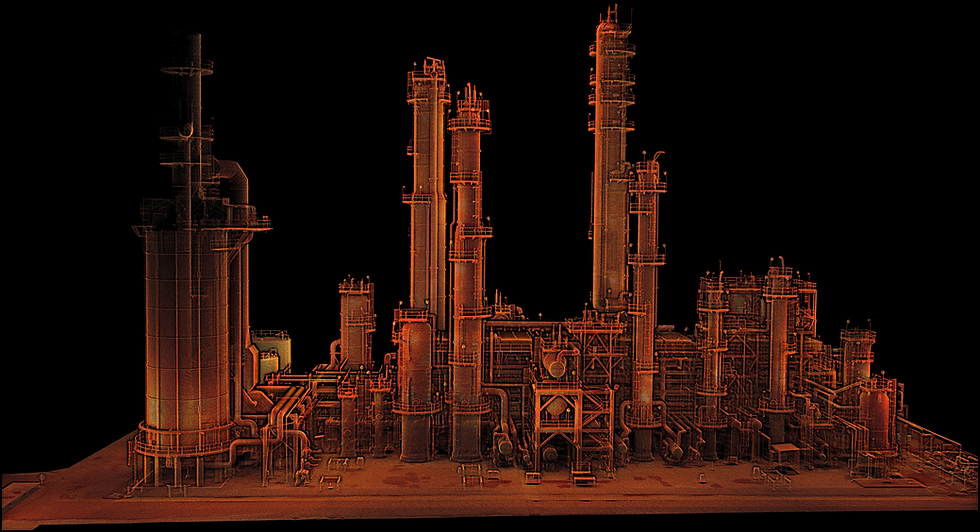
After the scan, we process the data into a point cloud using Emesent’s Aura software. For editing and visualization, we prefer CloudCompare, a powerful open-source tool.
Here’s how we get the best results:
Change background to black
Adjust display and scalar field settings
Use the “Segment” tool to crop excess data
Clean outlier points using the Statistical Outlier Removal (SOR) filter
These steps drastically improve processing efficiency and clarity.


Technology Limitations
SLAM-based scanning has improved dramatically, however, the technology still has some limitations when compared to traditional scanners.

Colorization
SLAM scanning isn’t perfect at capturing photo-realistic color. Some systems, like Emesent, add a camera module, but the image quality still trails behind traditional tripod-mounted scanners.
Accuracy
Tripod scanners offer up to +/- 1mm precision. SLAM devices average +/- 5mm. Still, for hundreds of EDS applications, SLAM scanning has been more than sufficient for generating construction-grade deliverables.
Final Thoughts
The ability to scan high-risk areas remotely, with less time and fewer people on-site, dramatically reduces operational hazards. That’s a win for safety, speed, and budget.
We’ve scanned hundreds of industrial sites with this method, and the results speak for themselves. Less time in the field. Safer inspections. Better data.
Read More: If you're looking to modernize how your engineering team captures as-built conditions, drone-based laser scanning is a great place to start.